|
|
Recruitment of Assistant Security Officers (on Contract)
|
User Instructions for submitting applications
|
Applications for the post of Assistant Security Officer (on Contract) of the Central Bank of Sri Lanka are accepted only through this online recruitment system, and you are allowed to submit ONLY ONE (01) application. Therefore, you are advised to read and follow the instructions given below very carefully before filling the application.
|
Please refer to the detailed advertisement via below link for eligibility criteria and more details.
|
https://www.cbsl.gov.lk/en/careers
|
Applications from candidates who do not meet the minimum requirements as of the application closing date will not be considered for this post. Any application not meeting the required qualifications, received after the deadline or not in the prescribed format, will be rejected without any notice at any stage of the recruitment.
Misrepresentation and/or providing of false information, or willful suppression of any material fact, will render the application invalid and if found subsequently to the appointment, you will be dismissed without any compensation.
|
Instructions for setting up your account and log in to the system
|
- Read the instructions and click on "Continue" button to register.
- To register, applicants are required to have a valid email address. It will be the applicant's username.
- Enter your email address and click on “Register User” button. You will receive an automated e-mail to your inbox with the password to log in to the system.
- To log in to the system, enter your email address as the Username and the above Password. Upon successful login you will be redirected to another page to Change the Password.
- The password should be between 8-12 characters in length and must contain at least one digit and a character.
- If you forget the password and need a new password, click “Forgot your password?” link under the login area and enter your email address. You will receive an automated e-mail with the new password.
|
Instructions for filling your application
|
|
Important: Applications should be filled only in English language.
|
- Log in to the CBSL Recruitment System. You will be directed to a page with the application form.
- Fill the “Personal Details” tab and move to the next section/tab by clicking “Save & Next” button.
- Visit all the tabs and fill the required information. The “Submit Application” tab will appear at the end of the application.
- For any modification, visit the relevant tab/s, make change/s and save before submitting.
- Please check the duly filled application before clicking on the “Submit” button in the last tab.
- You will not be allowed to make any changes to the information provided after submitting the application.
- You are required to upload following documents as applicable, make sure to have scanned copies of the required documents in advance. Please note that you are allowed to upload maximum of ten (10) documents in PDF file format with maximum file size of 2 MB each. Further instructions are given in "Upload Documents" tab.
- Age and Qualifications are validated against the eligibility requirements for the post.
- Applications can be completed in parts but should be submitted only once. Click on the “Save & Exit” or "Exit" button to keep your application saved for a later submission.
- You are required to upload copies of the relevant documents before submitting the application. Please note that you are allowed to upload maximum of ten (10) documents in PDF file format with maximum file size of 2 MB each. Further instructions are given in "Upload Documents" tab.
- a. National Identity Card (Compulsory)
- b. Birth Certificate (Compulsory)
- c. GCE O/L certificate (Compulsory)
- d. GCE A/L certificate (Compulsory)
- e. Service Book First Page or Police Service Letter (Compulsory)
- f. Service Letters from other organizations (if employed)
- g. Certificates for other Qualifications (if applicable)
- Upon submission, an application reference number will be displayed on the summary page. Keep it safely for future references.
- Application can be completed in parts but should be submitted only once. Click on the “Save & Exit” or "Exit" button to keep your application saved for a later submission.
|
|
Additional Information
|
|
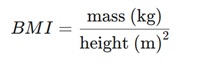
You can calculate your Body Mass Index (BMI) using the formula below or by following this link.
|
|
|
https://nutrition.health.gov.lk/english/body-mass-index-bmi/
|
|
|
|
If you need any assistance, please contact dhr@cbsl.lk or 011-2477330 or 011-2398782 between 8.00am to 4.00pm during weekdays except for bank holidays.
|
|
|
|
|